|
!Reporter
v2.66a (24 Apr 2011)
|
The !Reporter application provides commands to display information in the Reporter window which can be very useful when developing and debugging Wimp programs and Obey files.
There are many new facilities with this release. The major ones are ...
- New *ReportMods command, to display the Relocatable Modules which
are loaded, with more information than *Help Modules and *Modules
combined.
- New *ReportTasks command, to display a list of the running tasks.
- New microsecond Time ability and *ReportTime0 command, when Druck's
Timer Module installed.
- The *ReportMem command now includes Slotsize, addresses and string
free space from Basic.
- New facility to *Report *command for any command.
- New *ReportStack command, to just display current Basic stack.
- New *ReportDebug command, which is an attempt to provide a single
command which can be included at the start of a BASIC program, to
help debugging of any subsequent error by providing information about
how the program has got to the error. It provides many of the
facilities of *ReportTrace PROC Values with *ReportError, plus some
extra information, but with no Trace overhead.
- New *ReportHeap command, with heap statistics, validation and
optional block list & dump, replacing *ReportRma
- Suppressed Basic *ReportTrace On/Off msg if no change in status.
- Added Library name to BasicError.
- *ReportClear now automatically Unpauses.
- New *ReportShow command, replacing *ReportUnHide.
- New *ReportPause and *ReportScroll commands and SWIs.
- New Watchdog facility.
- Runs on all currently known versions of RISC OS, including
BeagleBoard.
- Many minor fixes and improvements to program and documentation.
- ... and there may be some new bugs!
The main facilities of Reporter are ...
- Report command for Basic programs to display text, values of variables, evaluated expressions, and storage, just with commands, time - NO additional Basic PROCs or FNs.
- Report command can be used from command line or obey files.
- All OS Commands executed can be displayed, including any error messages, and optional Time and Source.
- Any Error or WimpError messages and codes can be displayed.
- ReportDump command for displaying storage.
- ReportTrace command for displaying Basic TRACE output (on Iyonix indents and reports ENDPROC/ENDFN.)
- ReportPoll command for easy displays of WimpPoll reason codes.
- ReportWhere command for displaying information about the latest abort.
- ReportStack to display the Basic Stack (like a traceback facility).
- ReportDebug to display Basic stack and error information.
- ReportBreak procedure to set up Breakpoints, where variables can be displayed and changed.
- ReportRma commands to display arr RMA storage Claims, Frees and Extends.
- ReportTask commands to display all Wimp Task Inits and Closes.
- ReportHeap command to display heap statistics, validate the heap, and optionally list and dump blocks of data.
- Anything written to file system Report will be displayed.
- Anything output after VDU 4 from a task can be displayed.
- The text and background can be coloured in many of the Wimp colours.
- Reporting can be turned On or Off, from the program or externally.
- The display can be saved to a file, with an automatic numeric suffix.
- Basic memory usage summary can be displayed.
- Basic Errors can be displayed, and Throwback invoked to display the line in error.
- Obey files can display text, and values of OS Variables.
- Assembled code can display text, and values of registers, using SWIs or FNs from Basic.
- Ada95 code can display text, and values of OS variables.
- Help information in StrongHelp format for ease of use.
- All Reporter commands can be used during the whole RISC OS !Boot sequence.
- Choices file to set initial startup customisation.
- Will run on RISC OS v3, v4, v5 and v6, including Iyonix and Beagleboard in 32 bit mode.
Commands Provided
A brief introduction to the main commands available follows:
*Report [ <text> | <<OsVariable>> | <BasicVariable> | (<BasicExpression>) ]
- This takes any text passed to it and displays it in the Reporter window.
- If an OS variable is found it will display <variable>=value.
- If \t is found, it will display the time.
- If a Basic variable name is found, it will display name=value.
- If a Basic expression is found in brackets (), it will display (expr)=value.
- If a numeric Basic variable or expression is preceeded by a ~ sign the output is in Hexadecimal.
*ReportCmdOn [<text>]
- Turns Reporting On for all RISC OS Commands executed - including Aliases, Comments and empty lines.
- Each Reported command line can start with a optional timestamp.
- If a command returns an error message, it will be displayed with a Red Background.
- Reporter can be started in !Boot.!Run, enabling all commands run during Boot to be seen.
*ReportErrOn [<text>]
- Turns Reporting On for any Errors, which will then display giving the time, the Error Number and the Error Message, all with a Red background. This can be useful if you want to look back over the exact error messages, or copy them for a bug report.
- If it was a Wimp Error, displayed in an error box, any Task Name is also displayed. (RISC OS v3.50+)
*ReportClear [ <text> ]
- Clears the Reporter window, then displays any text.
- It can also be used from the Reporter menu.
*ReportOff [ <text> ]
*ReportOn [ <text> ]
- These commands will turn all reporting Off/On.
- They enable easy control over which reports are produced without adding/removing many other commands.
- They can also be used from the Reporter menu.
*ReportDump [(start)] [(length)] [(width)] [text]
- Displays the storage from the expression (start) for (length) bytes, with display width of (width), in Hexadecimal and Character format, with the address of each line and the offset of the line from the beginning.
*ReportTrace [OFF] [ON] [PROC] [<number>] [<text>]
- Displays the output from a Basic TRACE command, which can help detailed investigation of small parts of a program.
- The normal Basic TRACE cannot be displayed to the screen from a Wimp program in realtime, without splatting it all over the screen, so it is not much use. *ReportTrace enables it to be easily used.
*ReportError [Throwback]
- This command is intended to be placed in an Basic error handling routine.
- It will display the error and error line in the Reporter window.
- If Throwback was specified, a Throwback window will open with the filename, and the error line and message. Clicking on this line will load the program into Zap (or another suitable Throwback Handler) if not already loaded, then display the program in error at the line in error.
*ReportDebug
- This command can be placed at the start of a Basic program.
- When an error happens, it will display the Basic stack (giving details of all PROCs, FNs, FOR, REPEAT and WHILE statements active at the time of the error thus providing a traceback), plus details of the error.
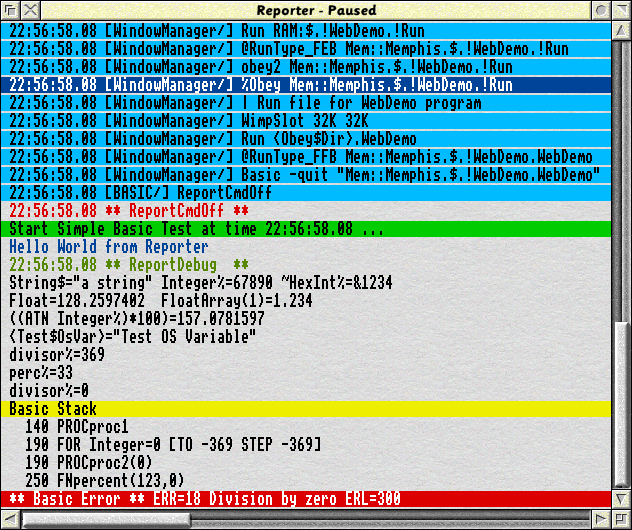
Example of Reporter Usage
A simple Basic program ...
010 : REM Simple Reporter Demonstration
020 : ON ERROR END
021 : *ReportCmdOff
030 : *Report \G Start Simple Basic Test at time \t ...
040 : *Report \b Hello World from Reporter
050 : *ReportDebug
060 : String$="a string" :Integer%=67890 :HexInt%=&1234
070 : *Report String$ Integer% ~HexInt%
080 : Float = 9876/77
090 : DIM FloatArray(5) :FloatArray(1) = 1.234
100 : *Report Float FloatArray(1)
110 : *Report ((ATN Integer%)*100)
120 : *Set Test$OsVar Test OS Variable
130 : *Report <Test$OsVar>
140 : PROCproc1
150 : END
160 :
170 : DEF PROCproc1
180 : FOR I% = 369 TO -369 STEP -369
190 : PROCproc2(I%)
200 : NEXT
210 : ENDPROC
220 :
230 : DEF PROCproc2(divisor%)
240 : *Report divisor%
250 : perc% = FNpercent(123,divisor%)
260 : *Report perc%
270 : ENDPROC
280 :
290 : DEF FNpercent(A%,B%)
300 : = A% / B% * 100
... and the Reporter display, showing simple Obey file and Basic program running
Analysis Utilities
There are two optional analysis utility applications also available:
!ReportTA
analyses Trace data from BASIC programs collected by the !Reporter command
*ReportTrace, counting the number of times Procedures, Functions, or even
Lines are used. This enables the easy identification of program code that is: inefficient, so it can be optimised;
very heavily used, so it can be optimised;
never used, either for further testing, or removal.
!ReportRMA
analyses Trace data from RMA Storage activity collected by the !Reporter command
*ReportRmaOn, counting the number of storage Claims, Frees and Extends, and checking if there are any Frees or Extends without a Claim, or any Claims without a Free.
Note that they are both in separate download files, and also need ArmSort to run.
Recent Change History
14/03/2006 v2.64 Release version
05/02/2010 v2.64 Update to the latest available.
21/04/2011 v2.66 Release version with many changes.
24/04/2011 v2.66a Minor change to remove RMA Heap list when started during Boot.
How to obtain Reporter
To download please click on the files below:
| Application | Version | Date | Download | Description
|
|---|
| !Reporter | v2.66a | (24 Apr 2011) | 95 kByte | This is a full archive of the latest version.
|
| !ReportTA | v1.02 | (12 May 2004) | 14 kByte | This supplementary application analyses Trace data from BASIC programs.
|
| !ReportRMA | v1.00 | (19 Jan 2006) | 11 kByte | This supplementary application analyses Relocatable Memory Area (RMA) Claim,
Extend and Free data.
|
Please click home to return to the Avisoft home page.
E&OE. © Copyright Martin Avison, 2011.
Last updated: Sun 24th April 2011
Please send any queries or comments to
This site is hosted by Force9 on PlusNet